

Most people who dream up a tune never get to hear it fully realized. The distance between a humming voice and a finished arrangement often spans years of instrumental practice or the cost of hiring a producer. That barrier keeps countless ideas locked inside casual creators, small business owners, and content makers who simply never learned to write music. The AI Song Generator does not erase this distance completely, but it does shrink it dramatically for anyone willing to describe what they want clearly. In the time I spent testing it, the tool consistently turned raw text ideas into structured pieces of music. Some outputs felt flat and needed another attempt, while others surprised me with how closely they matched a mood I had only vaguely worded. That blend of hit and miss is exactly what makes the experience feel like a genuine creative tool rather than a gimmick.
The Old Path and the New One: A Side-by-Side Look
To understand what shifts when a text-to-music generator enters the picture, it helps to compare the usual journey of a non-musician with a practical alternative. The table below lays out the contrast for a single short project, such as a background track for a two-minute product video.
| Stage | Typical Non-Musician Route | With the AI Song Generator |
| From idea to first audible version | Days or weeks spent searching royalty-free libraries, often settling for a piece that feels only halfway right. | A text prompt written in minutes, generating a first listenable candidate almost immediately on a paid plan. |
| Customizing sound to fit a scene | Requires negotiating revisions with a hired composer or learning editing software to chop and layer loops. | Offering the engine a refined description regenerates a new arrangement, no external revision cost. |
| Securing clear usage rights | License terms can be ambiguous on free platforms; commercial use often demands an upgrade or separate payment. | Paid tiers explicitly grant a commercial license, while the free tier remains non-commercial and publicly visible. |
| Final polish and export | May need manual mix tweaks or fade edits in a digital audio workstation. | Downloads as a clean MP3; basic trimming or level adjustment can be done in any free audio editor. |
This comparison does not suggest that AI output matches the nuance of a human composer who scores to picture. It does suggest that for many lightweight, time-sensitive projects, the AI path removes several persistent obstacles.
Turning Words Into a Finished Song: The Core Three Steps
The platform’s workflow revolves around a sequence that keeps the technical barrier extremely low. Still, the quality of the result depends on the thought you put into each stage.
Step 1: Shape a Text Prompt That Guides the Engine
A generic prompt tends to produce a generic song. In my tests, the tracks that sounded most intentional came from descriptions that named a clear genre, a tempo range, a lead instrument, and an emotional color. A direction like “mid-tempo indie folk with fingerpicked acoustic guitar and a hopeful, airy female vocal” gave the AI a much tighter target than just “happy folk song.”
Using basic mode for fast sketches and custom mode for control
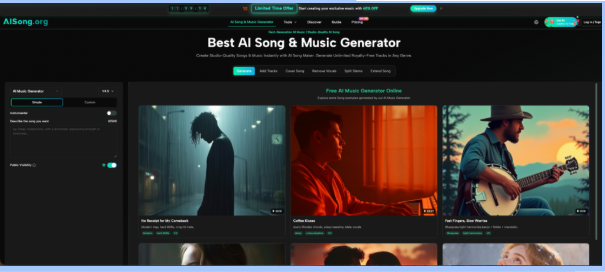
The free tier offers the Basic Model, where a single text box accepts your complete description. This mode is quick and surprisingly capable with clearly written cues. Paid plans unlock Custom Mode, which breaks the input into separate fields for mood, instruments, and structure. When I tried Custom Mode, the arrangements gained noticeable cohesion because I could specify, for instance, “warm electric piano” independently from “upbeat but relaxed.” The extra step took perhaps forty more seconds of typing but consistently spared me a throwaway generation.
Step 2: Review the Initial Generation and Refine
Once submitted, the AI builds a full arrangement within a minute on prioritized queues, or after a short wait on the free shared queue. What plays back is a complete musical statement, not a raw stem collection. In my experience, the first version rarely became the final one. Instead, it served as a high-quality sketch that revealed what the engine understood and what it missed.
Learning when to tweak the prompt versus start fresh
Several patterns emerged during my sessions. If the vocal tone came out too processed, adding “natural, breathy vocals” to the description moved it in the right direction. If the bass line felt too busy, I swapped “driving bass” for “simple, steady bass.” Most importantly, I learned not to overhaul the entire prompt at once. Changing one variable at a time made it easier to trace what each adjustment did. After two or three iterations, the output usually reached a point where I could use it directly as background scoring.
Step 3: Download the Track and Confirm Your License Fit
When a generation clicks, the platform lets you save it as an MP3 with a single click. The exported file plays without any spoken watermarks, and the audio quality has been consistent across my downloads.
Checking privacy settings and usage rights before using the file
Free-tier creations are publicly visible by design, meaning anyone browsing the platform may encounter your song. Commercial use is not covered on that level. Paid subscribers gain a private toggle and a commercial usage right, which is essential if the track goes into monetized client work or ad content. I suggest confirming these settings right after downloading, rather than later discovering you need to re-licence something you have already placed in a video timeline.
Where the Tool Shines and Where Patience Is Required
Based on both my own trials and wider conversations in creative forums, the AI Song Generator is strongest when the ask is short-form, genre-clear, and not overly dependent on complex dynamics. A two-minute intro piece for a podcast, a thirty-second sting for a YouTube channel, or a stylistic prototype for a songwriter who wants to hear a verse in pop-punk instead of folk all sit comfortably within its reach.
Where it currently shows limits is in long-range narrative and deeply expressive performance. Tracks that needed a raw, slightly unpolished edge sometimes arrived sounding overly tidy, as if the engine smoothed out the very quirks I was hoping for. A separate report from MusicTech on the state of AI music notes that generative models remain challenged by emotional arc and vocal subtlety across a full song length, an observation that matches what I heard. This is not a failing of this particular tool so much as a reflection of where the broader technology sits right now. Managing expectations here turns a frustrating limitation into a simple creative constraint: use the AI for structure and atmosphere, then add human touch elsewhere if you have the means.
Who Might Stop Searching for Stock Music and Start Describing
The creators who stand to gain the most from this workflow are those for whom “good enough, distinct, and quickly obtained” outweighs “pristine and painstakingly crafted.” A small agency producing weekly social content can stop recycling the same three royalty-free loops. A solo entrepreneur recording a course can generate chapter-intro music that matches the exact energy of each module. A curious hobbyist can finally hear that melody they have carried around for years, arranged with drums, bass, and keys they never learned to play. For all of them, the value lives not in replacing musical skill but in offering a bridge across the skill gap that once felt permanent.