



Finding the right background music for a guided meditation used to mean browsing through stock libraries, negotiating licenses, or hiring a composer. Musick AI changes that entirely — it’s a free AI Music Generator that lets wellness creators, coaches, and educators build exactly the music they need, without the usual friction.
I. Why Stock Music Fails Meditation Creators
Ambient track libraries are convenient on the surface, but they come with hidden costs that add up fast.
- Most stock platforms charge per track, per project, or lock quality tiers behind expensive subscriptions.
- Pre-made tracks are generic — they weren’t built for your pacing, your narration gaps, or your audience’s mood.
- Licensing restrictions often block commercial use, which matters for meditation apps, YouTube channels, and paid courses.
Creating something original isn’t a luxury for wellness creators — it’s a practical need.
II. What Musick AI Actually Does
Musick AI is a browser-based music generation tool. No downloads, no studio experience required.
- Text Prompt to Full Track
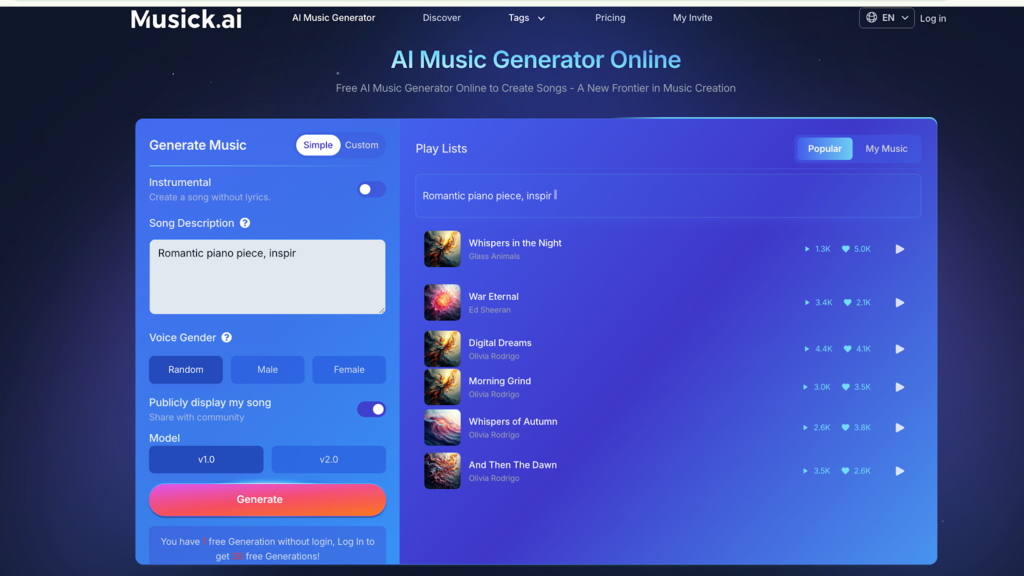
Type a description of what you want — something like “calm ambient music with soft strings and slow tempo” — and the generator produces a track based on that input. The more specific the prompt, the closer the result matches the intended mood.
- Instrumental Mode
For guided meditations, vocals are usually the last thing wanted in a backing track. Musick AI has a dedicated Instrumental toggle that strips out vocals entirely, leaving a clean soundscape for narration to sit on top of.
- Genre and Style Flexibility
The tool supports a wide range of genres, including Classical, Jazz, and ambient-adjacent styles. Meditation creators can steer toward slow, soft, and acoustic-heavy compositions simply by adjusting the text prompt.
III. Royalty-Free by Design
One of the more practical features of Musick AI is its approach to copyright. Every track generated through the tool is royalty-free and built to comply with copyright law.
- Music can be used on YouTube, Instagram, Facebook, LinkedIn, and TikTok without copyright claims.
- Commercial licensing is included, which matters for creators monetizing their content.
- The platform’s music library is built with full consent and strict copyright adherence.
This removes the legal guesswork that often surrounds independently sourced ambient music.
IV. Tools Beyond Basic Generation
Musick AI goes further than a single generation button. The platform includes several specialized tools that can support a broader content workflow.
- AI Song Lyrics Generator
Input music genres and moods, and the lyrics generator produces text tailored to that style. Useful for creators who want original affirmation tracks or mantra-style songs alongside instrumental pieces.
- AI Beat Producer
Write down your melody notes in the Beat Producer to shape the rhythmic foundation of a track. Helpful for creators with some musical intuition who want more control.
3. AI Music Maker for Multiple Formats
Whether the output is for a podcast, a YouTube meditation video, or an in-person yoga class, Musick AI supports generation across use cases — all from a single interface.
V. How to Generate a Meditation Track
The workflow is straightforward and takes only a few minutes.
- Go to Musick AI and open the Generate Music panel.
- Select Instrumental mode to disable vocals.
- Write a detailed text prompt — include mood, instruments, tempo feel, and theme (e.g., “peaceful ambient track with soft piano and gentle background pads, slow and spacious”).
- Choose a model and vocalist gender preference if applicable (though for instrumentals, this is less relevant).
- Hit generate and review the output.
- Download the track and drop it directly into your project.
A more descriptive prompt consistently produces better results. Mentioning genres, moods, or instruments helps the AI Song Maker understand the direction more precisely.
VI. Practical Tips for Meditation-Specific Tracks
Getting useful output for guided meditation requires a slightly different approach than generating a pop track.
- Be specific about tempo. Phrases like “slow BPM,” “spacious,” or “breathing room between notes” steer the output toward meditative pacing.
- Mention the instruments. Strings, piano, ambient pads, singing bowls, or flute all push the track in the right direction.
- Avoid artist references. The tool works better with genre and vibe descriptions rather than comparisons to specific musicians.
- Iterate quickly. The generation process is fast — run several variations on the same prompt and keep the one that fits best.
VII. Who This Tool Is Built For
Musick AI covers a broad range of creator needs, and the use cases for meditation content specifically are well within its wheelhouse.
- Wellness coaches: producing guided audio for clients or courses
- Yoga instructors: needing continuous, uninterrupted ambient background music
- Podcast producers: creating sleep or mindfulness episodes
- Educators and therapists: using music as part of structured sessions
The platform explicitly lists therapy as a supported use case — selecting music to “cure unhappiness” is how the site frames it. That kind of emotional alignment is exactly what meditation music needs to achieve.
Conclusion
Ambient music for guided meditation doesn’t require a licensing deal or a music budget. Musick AI gives creators a fast, legally clean, and surprisingly flexible way to generate the tracks they actually need — built around a simple text prompt and a single click.